
Datahawk Review – Best New Analytics Suite for Amazon Sellers

What is DataHawk?

DataHawk Amazon Analytics is a platform designed to make it easier for Amazon sellers, brands, and agencies to understand what’s really happening with their products. Instead of jumping between Seller Central, spreadsheets, and different marketplace reports, DataHawk pulls all your key data into one place. You can see your sales trends, keyword rankings, Buy Box performance, pricing changes, and customer reviews at a glance, which makes it far easier to spot what’s working and what needs attention.

What really sets DataHawk apart is how it connects the dots between your Amazon SEO, product listings, and ad performance. You can track how your keywords move up or down the rankings, see how those changes affect traffic and sales, and compare your performance to competitors. For sellers managing multiple ASINs or marketplaces, this kind of visibility can save hours of manual tracking and help you make decisions based on real insights instead of guesswork.

On top of that, DataHawk includes helpful alerts and automation features that notify you when something important happens, like losing the Buy Box or a sudden spike in negative reviews. You can build dashboards tailored to your team, share reports, or export your data into tools like Tableau or Looker Studio. In short, DataHawk turns raw Amazon data into clear, actionable information that helps sellers optimize their listings, fine-tune advertising, and stay ahead in an increasingly competitive marketplace.

Conclusion

DataHawk Amazon Analytics gives sellers a clear, centralized view of their Amazon business by bringing together sales data, keyword rankings, product performance, reviews, and advertising metrics in one platform. It helps brands understand what’s driving results, identify issues before they become costly, and make smarter decisions backed by real marketplace insights. With customizable dashboards, alerts, and competitive intelligence tools, DataHawk turns complex Amazon data into actionable strategies that help sellers improve listings, optimize ad spend, and stay ahead in a competitive environment.

Who is DataHawk Best For?

DataHawk is ideally suited for Amazon (or multi-marketplace) sellers and brands that are established, growing, or scaling, especially those with a large catalog, multiple products or clients, and a desire to deeply understand sales drivers, market trends, and profitability. If you’re running a small test or just starting out, its power might go underutilized.

Great candidates for DataHawk

  • Sellers or brands with many SKUs or multiple products. If you manage dozens, hundreds, or even thousands of products on Amazon (or across marketplaces), DataHawk’s ability to deliver detailed performance data, SKU-level profitability, and daily KPI tracking makes it much easier to stay on top of everything.
  • Businesses focused on growth – sales, visibility, and profitability. If you care about tracking keyword rankings, monitoring Buy-Box performance, understanding how ads and organic sales work together, and optimizing pricing, DataHawk gives you the data backbone to make strategic moves rather than guesswork.
  • Agencies, consultants, or multi-brand operators. For people or companies managing multiple Amazon accounts or clients, DataHawk supports cross-account analytics, multi-client dashboards, and reporting — making it easier to oversee many storefronts at once.
  • Sellers who want more than basic data – advanced analytics, forecasts, and market intelligence. If you want insights beyond Amazon’s native reports like sales estimates, market share tracking, competitor monitoring, forecasting, and integration with BI tools, DataHawk delivers those, which is valuable for scaling and strategic decision-making.

When DataHawk might be less useful

  • If you’re a very small, new seller with only a few SKUs, the breadth and depth of data might be overkill, there might not be enough volume to justify the cost or complexity. As some reviewers say, DataHawk is “more feature-rich than basic analytics tools,” which can feel overwhelming without scale.
  • If you only need simple, occasional reporting or don’t have the resources to actively interpret data, a simpler tool might suffice instead of a comprehensive analytics platform.

DataHawk Pros and Cons

PROS
  • Comprehensive, unified analytics - DataHawk consolidates sales metrics, SEO and keyword tracking, product performance, ad data, Buy Box status, reviews, and profitability into a single dashboard. This allows sellers to view multiple performance indicators in one place rather than relying on separate tools.
  • Customizable dashboards and flexible reporting - The platform offers configurable dashboards and reporting options, along with data exports to tools like Power BI, Tableau, and Google Sheets. This can be useful for teams that need to present performance data or manage a large catalog of products.
  • Real-time alerts and automated monitoring - DataHawk includes automated alerts for notable events such as Buy Box changes, ranking shifts, listing modifications, or review activity. These notifications can help sellers identify and address potential issues more quickly.
  • Competitive intelligence and market visibility - Users can analyze competitor movements, category trends, best-seller rankings, and market dynamics. This provides additional context around how their products are performing relative to the broader marketplace.
  • Scalable for larger catalogs and multi-marketplace operations - DataHawk is built to support brands managing many SKUs or selling across multiple marketplaces. Its infrastructure is designed to handle high-volume tracking without significant slowdowns or data limitations.

CONS
  • Learning curve and setup time - Because the platform includes a wide range of features and granular data points, new users may need time to understand the interface, configure dashboards, and interpret metrics. Smaller sellers or those without analytics experience might find the onboarding phase more demanding.
  • Pricing transparency and cost considerations - DataHawk’s pricing is based on usage variables (such as SKUs, keywords, and data credits), and quotes can vary significantly. This makes it difficult to estimate total costs upfront, which may not be ideal for teams with strict budgets or those comparing fixed-price alternatives.
  • Advanced customization may increase effort or cost - While the tool offers strong core functionality, more advanced reporting, highly tailored dashboards, or deeper integrations may require additional setup work or incur extra costs beyond the base offering.
  • May exceed the needs of early-stage or low-volume sellers - For businesses managing only a few products or operating at a small scale, the platform’s depth may be more than necessary. In such cases, lighter or more streamlined solutions might provide better value until the operation grows.
  • Focused marketplace analytics rather than full ecommerce coverage - DataHawk specializes in marketplace performance tracking. Sellers seeking a broader omnichannel solution, including social platforms, DTC storefronts, or non-marketplace data, may find that it does not cover all aspects of their ecommerce ecosystem.

Conclusion

DataHawk is a powerful analytics solution built for serious sellers, brands, and agencies that want deep visibility into their Amazon performance. But if you're small, just testing the waters, or don’t have the time to dig into detailed metrics, it may be more tool than you need right now.

DataHawk Pricing

DataHawk does not use a fixed, “one-size-fits-all” pricing table visible on its site. Instead, the cost is customized based on how much you use it, things like number of products (ASINs), keywords, categories you track, and sales volume.

Pricing Component Description Example
Platform fee A base platform fee that depends on your overall business volume and usage level. Larger sellers or brands with higher revenue, more marketplaces, or complex needs typically pay a higher platform fee.
Credit fee A variable fee based on how many SKUs, keywords, and categories you track inside DataHawk. 1 product = 1 credit, 1 keyword = 1 credit, 1 category = 50 credits. Total cost scales with how much data you monitor.
Enterprise add-ons Optional add-ons for larger brands, agencies, or enterprises that need advanced capabilities. White-label dashboards, managed databases, and premium support are available as extra services, priced based on scope.

What This Means in Practice 

Potential advantages

  • Pay only for what you use
    The usage-based pricing structure allows businesses to align costs with their actual needs. Sellers with smaller catalogs or fewer tracked keywords aren’t required to purchase plans designed for much larger operations.
  • Scales with operational growth
    As a business expands — adding more SKUs, tracking additional keywords, or managing multiple marketplaces — the platform can scale accordingly. Optional features like white labeling, BI data exports, or premium support can be added when they become relevant, rather than paid for upfront.

Potential limitations

  • Costs aren’t fully transparent upfront
    Pricing requires a demo and a tailored quote, which makes it challenging to predict expenses before entering the sales process. This can complicate budgeting or direct comparison with tools that publish fixed pricing.
  • May be less appealing for early-stage sellers
    For businesses exploring Amazon selling or managing only a few products, the investment may feel disproportionate relative to simpler, lower-cost alternatives.
  • Multiple pricing variables to evaluate
    The combination of platform fees, usage-based credits, and optional add-ons means buyers must understand their data needs clearly. Without careful planning, it’s possible to commit to more capacity or features than necessary.

DataHawk Feature Overview

DataHawk provides tools for understanding how products perform and rank on Amazon by tracking keywords, search visibility, and listing quality. Sellers can monitor daily keyword positions, research new keyword opportunities using reverse-ASIN data, and access updated search volume estimates to guide content and advertising decisions. The platform also evaluates listing optimization through a proprietary score, offering suggestions for improving product titles, bullet points, and backend keywords to support stronger visibility and conversion potential.

Beyond SEO, DataHawk delivers comprehensive sales and competitive intelligence. Users can track essential KPIs such as BSR, pricing, reviews, and estimated sales, alongside Buy Box ownership changes and historical sales trends for forecasting. Competitive tools help benchmark performance against other sellers, analyze market dynamics, and detect new entrants in a category. Customizable alerts, unified dashboards, and data export options streamline reporting, while AI-powered anomaly detection and guided recommendations assist in identifying unusual activity and refining strategic decisions.

Category Feature Description
Keyword & SEO Analytics Keyword Rank Tracking Monitor daily organic and sponsored keyword ranking trends for your products and selected competitors in near real-time.
Keyword Research Use a keyword database and reverse-ASIN capabilities to find new keyword opportunities based on Amazon customer search behavior.
Search Volume Data Access updated monthly search volume estimates to help identify high-demand and potentially lower-competition terms.
Listing Optimization Review a listing quality metric that evaluates how well a product page is optimized and see suggestions for improving titles, bullets, and backend keywords.
Product & Sales Performance Tracking KPI Monitoring Track daily movements in key metrics such as Best Seller Rank (BSR), price, review count, star rating, and estimated monthly sales.
Sales Estimates and Forecasting Use proprietary algorithms to estimate sales volume for specific ASINs and analyze historical performance where data is available.
Buy Box Tracking Monitor changes in Buy Box ownership over time to understand how often you or other sellers control the Buy Box.
Competitive & Market Intelligence Competitor Benchmarking Compare your product performance against selected competitors to identify trends and performance gaps.
Market Analysis Examine category and niche-level data, including price ranges and review profiles, to inform market positioning and product strategy.
New Entrant Monitoring Identify new products or sellers in your space to track emerging competition earlier.
Alerts & Reporting Customizable Alerts Set alerts for specific conditions such as ranking changes, price adjustments, review activity, or listing changes.
Unified Dashboards Build customizable dashboards to consolidate KPIs across products, brands, or marketplaces for different stakeholders.
Data Export & Integration Export datasets to CSV or Excel, or connect to BI tools like Power BI, Tableau, or Google Sheets via API for advanced analysis.
AI-Powered Insights Anomaly Detection Automatically detect unusual shifts in metrics, such as sudden sales spikes or drops, and flag them for review.
Guided Recommendations Receive AI-generated suggestions designed to support decision making across areas like pricing, inventory, or advertising.

DataHawk Support and Training

If you sign up with DataHawk, you should expect a supported transition, not just a software self-serve. From onboarding to live support, documentation to BI-tool templates, the goal is to help you leverage complex marketplace data without needing deep technical expertise.

For sellers scaling up or working across multiple marketplaces, the combination of hands-on onboarding, flexible training, and robust documentation can significantly reduce the “ramp-up pain.”

Category Offering Description
Support & Onboarding Guided Onboarding & POC New customers receive guided onboarding and proof-of-concept support, including help connecting Amazon or Walmart accounts, configuring dashboards, and getting familiar with key datasets, often with training adapted to their business needs.
Customer Success & Support A dedicated customer success and support team is available to assist with account questions, technical issues, and onboarding-related requests.
Professional Services for Larger Clients Agencies and enterprise users can access professional services such as custom onboarding, dashboard customization, managed data infrastructure (for example Snowflake or BigQuery), and periodic reviews to ensure the setup continues to meet business requirements.
Documentation, Tutorials & Training Public Documentation Portal A public documentation portal provides detailed guides on connecting and managing data sources, configuring dashboards, working with different modules, and setting up integrations with BI tools.
BI Templates & User Guides Ready-made templates and user guides are available for BI tools such as Power BI and Looker Studio, helping both technical and non-technical users visualize and analyze data without custom development.
Resources Library A resources library offers articles, insights, and best-practice content designed to help sellers refine their marketplace strategy and make better use of analytics over time.

DataHawk Customer Reviews

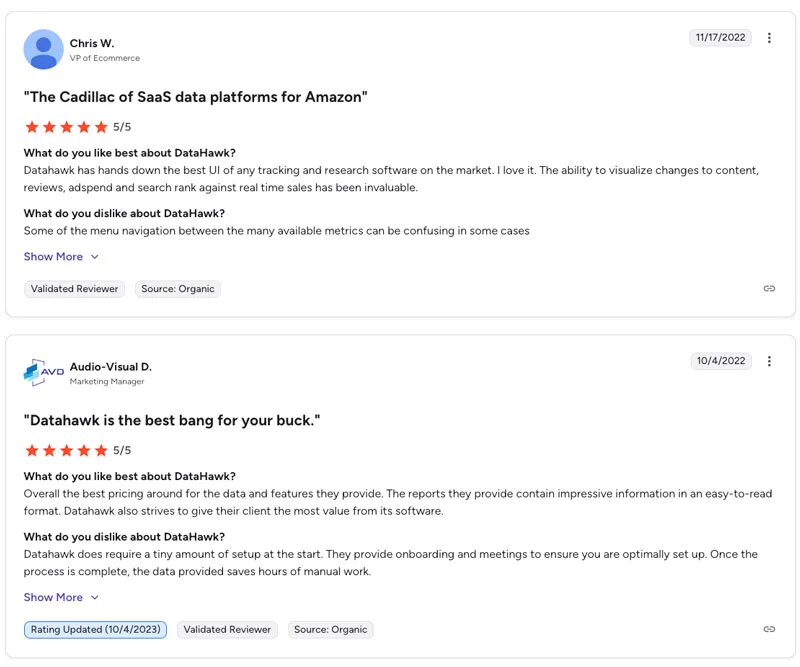
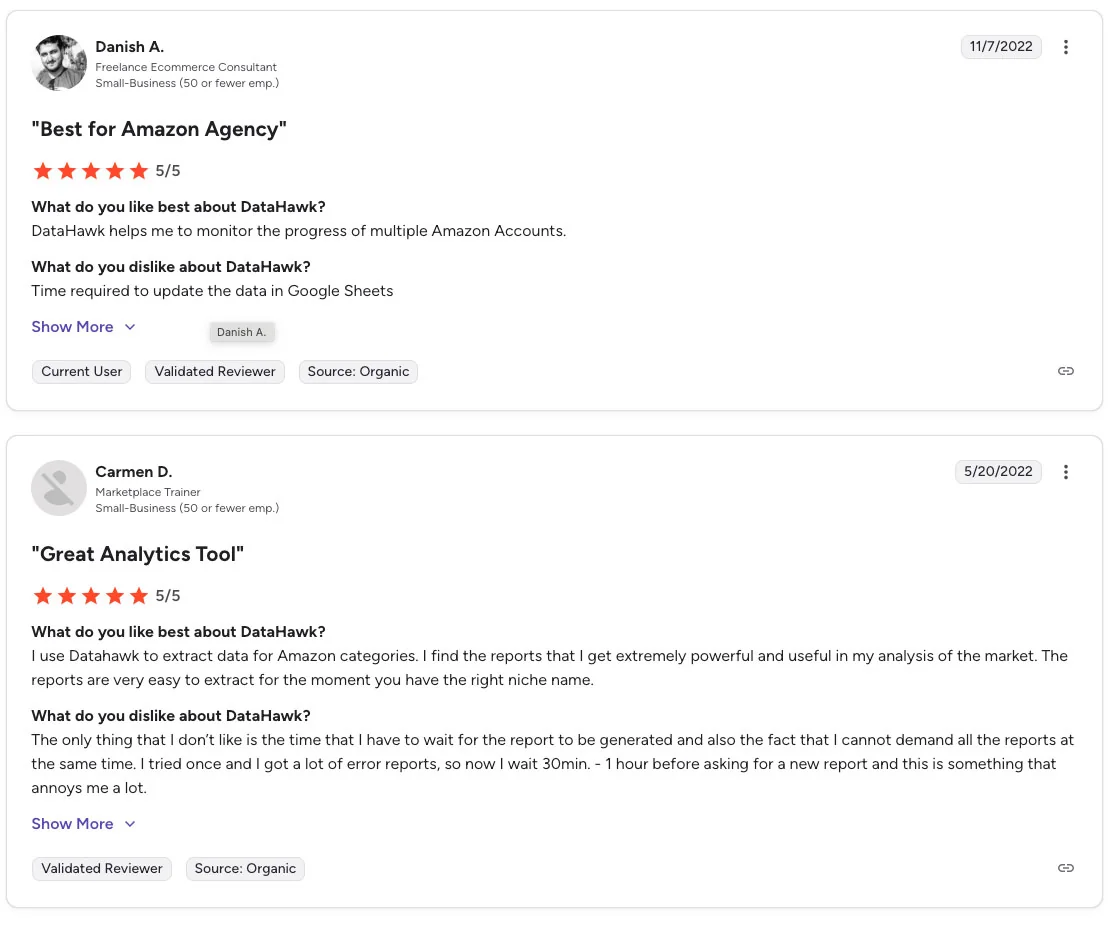
Customer feedback on DataHawk is largely positive, with many users noting that the platform delivers robust marketplace analytics and a user-friendly interface. Reviewers often highlight the ease of navigating dashboards, the depth of data available for Amazon and Walmart performance metrics, and the quality of customer support. Custom dashboards and data visualization tools are frequently mentioned as standout features, and some users feel the overall value justifies the investment given the range of insights provided.

However, experiences are not universally flawless. Several users point out that the initial setup requires time and guidance, particularly for those unfamiliar with analytics platforms. Others mention occasional data delays or inconsistencies, which can be disruptive for time-sensitive decision-making. Some reviewers also cite missing features or specific integrations they expected, suggesting the platform may not meet every operational requirement out of the box.

Cost is another recurring consideration. While larger brands and agencies often see the pricing as reasonable, smaller sellers may find the expense difficult to justify relative to their scale. Additionally, the platform’s comprehensive nature can feel overwhelming at first, resulting in a learning curve for users who aren’t accustomed to data-driven tools. Overall, reviews suggest that DataHawk is well-suited for businesses that need deep marketplace insights and can invest time and resources into leveraging its capabilities.
Conclusion: Is DataHawk Worth It?

Whether DataHawk is worth the investment largely depends on the scale, complexity, and analytical needs of your business. The platform stands out for its comprehensive marketplace insights, customizable dashboards, keyword and performance tracking, and strong support resources. For brands managing multiple SKUs, agencies handling multiple accounts, or established sellers who need a centralized analytics environment, these capabilities can provide a meaningful advantage. The platform’s ability to combine sales, SEO, advertising, and market intelligence data into a single view is particularly valuable for teams that rely on data-driven decisions.

However, DataHawk is not without trade-offs. Some users note a learning curve, especially during the initial setup, and occasional data delays or gaps may require patience or manual verification. Its pricing model, tailored to usage and business size, means costs can escalate as needs grow, which may be a concern for newer or lower-volume sellers. Those who don’t require deep analytics or prefer straightforward inventory or listing management tools may find the platform more than they need.

Conclusion

DataHawk is best suited for mid-sized to enterprise-level sellers, agencies, and data-oriented teams that can leverage its advanced analytics and are prepared to spend time configuring the platform. For businesses that simply want basic performance metrics or operate on a tight budget, simpler tools may be a better starting point. If your organization values comprehensive insights and scalability, DataHawk can be a strong fit; if not, the cost and complexity may outweigh the benefits.

DataHawk Frequently Asked Questions

You do not need technical skills or a development team to start using DataHawk. The platform is designed with a user-friendly interface, guided onboarding, and prebuilt dashboards, so most users can connect their Amazon or Walmart accounts, track products, and view analytics without writing code or managing data manually. For everyday tasks such as monitoring keywords, reviewing product performance, or configuring alerts, business users, marketers, and operators can navigate the tool independently.

That said, the more advanced capabilities of DataHawk, such as exporting data into BI tools, setting up API integrations, or customizing complex dashboards may be easier with some data fluency or technical understanding. These features are optional and primarily relevant for brands, agencies, or enterprises that want to incorporate DataHawk data into broader analytics workflows.

DataHawk is built so that non-technical users can get value right away, while still offering more advanced capabilities for teams that have the skills or desire to go deeper. The platform lowers the technical barrier to accessing marketplace intelligence, but also scales to support more sophisticated data needs when they arise.

Yes. DataHawk allows users to fully own and export the data collected through the platform. Rather than keeping information locked inside proprietary dashboards, the system provides export options in multiple formats, including CSV, Excel, and direct integrations with business intelligence tools like Power BI, Tableau, Google Sheets, and data warehouses such as Snowflake or BigQuery. This gives users direct access to underlying datasets for deeper analysis, reporting, or use in other internal systems.

This approach is particularly useful for brands and agencies that want to combine marketplace data with other sources, automate reporting, or maintain long-term historical datasets outside the platform. While most users can work entirely within DataHawk’s built-in dashboards, teams with more advanced analytics practices benefit from the ability to store, manipulate, and model the data independently.

DataHawk does not operate as a closed ecosystem. You retain ownership of your raw data and can take it with you, whether you want to create custom reports, integrate external tools, or migrate to a different analytics environment in the future.

DataHawk provides a broad range of analytics designed to give Amazon sellers visibility into how their products and competitors are performing. At its core, the software tracks product performance metrics such as Best Seller Rank (BSR), price changes, review activity, Buy Box ownership, and estimated sales, allowing sellers to monitor trends and make informed decisions about pricing, inventory, and positioning. It also includes detailed SEO and keyword analytics, including rank tracking, keyword research, and listing-quality evaluations, helping sellers understand which search terms drive visibility and which parts of their product pages may need improvement.

Beyond product-level data, DataHawk offers insights into advertising and financial performance, enabling users to see how paid campaigns interact with organic rankings and how those relationships affect overall profitability. Sellers can break down metrics by SKU, marketplace, or time period to identify where marketing spend is delivering returns and where adjustments might be needed. Competitive and market-intelligence tools extend this visibility further by analyzing category trends, competitor movements, pricing dynamics, and new entrants, giving sellers context around market shifts rather than isolated performance metrics.

Taken together, these analytics deliver both micro and macro perspectives on marketplace activity. Sellers can examine the details of a single ASIN or view broader market-level trends, enabling more strategic decision-making across operations, advertising, and product development.

Yes. DataHawk is designed to scale for larger sellers, multi-SKU catalogs, and agencies managing multiple accounts. The platform supports high-volume tracking across many ASINs and marketplaces, consolidating data into unified dashboards so you don’t have to juggle separate spreadsheets or tools manually. This means whether you have dozens or hundreds of SKUs (or more), you can monitor performance, keyword rankings, sales, and advertising in one place.

For agencies or enterprise-level clients, DataHawk offers infrastructure and configuration options, such as managed data warehouses or custom dashboard configurations, to support complex workflows and multiple brand or marketplace accounts under a single interface. That makes it a practical choice for businesses seeking to grow without outgrowing their analytics platform.

DataHawk aims to provide the flexibility, performance, and organizational features necessary to support large and growing operations, but as with any tool, the benefits will be strongest when the business actually needs that scale and consolidation.

Yes. DataHawk offers a trial/entry-level path, but with some caveats. Officially the company describes its onboarding process as including a proof-of-concept (POC) when you first sign up.

That said, what “free” means depends on what you need. The trial or lowest-tier plan appears to come with limitations, such as a cap on the number of ASINs or keywords tracked, and possibly fewer features compared with a full paid subscription. Because DataHawk’s pricing and plan structure is usage-based and custom-quoted, the trial may be more appropriate for small or entry-level sellers who want to test core functionality before committing.

If you’re testing the waters or running a small catalog, DataHawk offers a low-commitment way to try the platform. But if you need to scale up, many SKUs, multiple marketplaces, heavy keyword tracking, you’ll likely need a paid plan.

DataHawk does not use fixed, public pricing tiers. Instead, pricing is custom and depends on factors such as the number of connected marketplace accounts plus the volume of products, keywords, and categories you want to track or monitor.

Generally, the total cost includes a base platform fee plus usage-based “credits.” These credits cover tracked items: each product, keyword, or category tracked consumes credits. Additionally, there are optional add-ons for more advanced needs, for example, managed data-warehouse support, white-label dashboards, or premium support, which can influence the final price quote.

Because of this structure, you’ll typically need to book a demo or contact the DataHawk team to get a personalized quote that matches your business size and needs.

Yes. When you sign up for DataHawk, you generally receive support and onboarding assistance to help get you set up and running smoothly. The platform offers guided onboarding (often referred to as a “proof-of-concept” or POC), which helps with linking your marketplace accounts, configuring dashboards, and getting familiar with the main features and data views. This can be particularly helpful for sellers or teams who are new to Amazon analytics or who have multiple SKUs to track.

In addition, DataHawk provides a customer success / support team that users can contact if they run into questions, technical issues, or need help optimizing their setup. For larger clients, such as agencies, enterprise sellers, or businesses managing multiple brands, there may also be more advanced support options, including custom onboarding, dashboard customization, and managed data infrastructure setups.

Overall, the support-and-onboarding process means that new users don’t have to figure everything out on their own, they have access to guidance and resources that can make the transition smoother and reduce the time needed before deriving value from the platform.

Table of Contents

Exclusive December Discounts

Scroll to Top